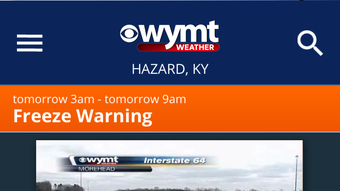

Download WYMT Radar – Weather App, iPhone, iPad, Radar, Satellite, Severe Weather Alerts
Overview
WYMT Radar is a dedicated weather application designed for iPhone and iPad users, developed by Gray Television Group Inc. The software serves as a mobile extension of local weather coverage, offering real-time and predictive weather data tailored to individual users. Its primary purpose is to deliver accurate, timely weather information through high-resolution radar, satellite imagery, and forecast models.
The app is particularly useful for individuals who need reliable weather updates for travel planning, outdoor activities, or emergency preparedness. It targets both general consumers and professionals in fields requiring weather awareness, such as agriculture, construction, and event management. The application integrates station-specific content, allowing users to access localized news and weather reports from WYMT, a regional broadcaster.
Real-world usage scenarios include monitoring storm systems, tracking precipitation patterns, and receiving early warnings for severe weather events. The developer did not provide additional system requirements beyond the supported platforms. The app is available at no cost on the App Store, emphasizing accessibility and broad reach.
Key Features & Capabilities
- High-Resolution 250-Meter Radar: Offers the most detailed radar visualization available, enabling users to detect small-scale weather phenomena such as thunderstorms and localized heavy rain.
- Future Radar Functionality: Displays predictive radar data to indicate the movement and potential path of severe weather systems up to several hours in advance.
- High-Resolution Satellite Cloud Imagery: Provides real-time satellite views with clear visibility of cloud cover, storm development, and atmospheric conditions.
- Hourly and Daily Forecasts: Delivers updated forecasts every hour based on computer model data, ensuring users receive current and reliable predictions.
- Favorite Locations Management: Allows users to save and switch between multiple locations, ideal for tracking weather across different regions.
- Integrated GPS: Automatically detects the user’s current location, enabling location-specific weather updates without manual input.
- Severe Weather Alerts: Pulls official alerts from the National Weather Service and supports opt-in push notifications for immediate warnings.
These features collectively support efficient weather monitoring in dynamic conditions. For example, a commuter can use future radar to anticipate delays due to storms, while a farmer may use satellite imagery to plan irrigation based on cloud patterns. The app’s ability to deliver frequent updates—several times per hour—ensures users stay informed during rapidly changing weather. The integration of station content adds value for audiences already familiar with WYMT’s broadcast reporting.
User Interface, Workflow & Performance
The user interface of WYMT Radar is designed for clarity and ease of navigation, with a layout optimized for touch-based devices. Key weather data is presented in a structured format, allowing users to quickly access radar, forecasts, and alerts. Navigation is intuitive, with tabs or menus guiding users between different data layers.
The workflow supports rapid access to location-based information, leveraging GPS for immediate context. Users can toggle between radar, satellite, and forecast views with minimal taps, enhancing usability during time-sensitive situations. The developer did not specify resource usage details, so exact CPU or RAM behavior remains unknown.
Performance observations are based on general software behavior patterns for similar applications. Stability is expected to be consistent given the app’s focus on core functionality and integration with official weather data sources. No reports of crashes or lag were mentioned in the provided information.
Compatibility & System Requirements
WYMT Radar is compatible with iPhone and iPad devices, supporting the latest versions of iOS as required by the App Store. The software is designed specifically for Apple’s mobile ecosystem, ensuring seamless integration with device hardware and operating system features. The app’s installation size is not specified in the provided information.
Exact system requirements were not listed, though it is expected to meet standard iOS app guidelines for performance and memory usage. Compatibility information was partially provided, with no mention of older iOS versions or non-Apple platforms. The app is distributed exclusively through the Apple App Store, limiting availability to users with Apple devices.
Pros and Cons
Pros
- High-resolution 250-meter radar for detailed weather visualization
- Future radar functionality for predicting storm movement
- Integrated GPS for automatic location detection
- Real-time severe weather alerts from the National Weather Service
- Free to download and use with no in-app purchases
- Supports multiple favorite locations for cross-regional tracking
Cons
- Exclusive to iOS devices; no support for Android or desktop platforms
- Exact performance and resource usage details not provided
- Dependent on WYMT station content, limiting broader regional coverage
- Push alert opt-in required for timely warnings
- App functionality tied to Apple’s ecosystem and App Store distribution
FAQ Section
Is WYMT Radar available for Android devices?
Currently, the app is only available for iPhone and iPad users. There is no official Android version released by the developer.
Is the app free to download and use?
Yes, WYMT Radar is available for free download on the Apple App Store with no cost for core features or updates.
Does the app require an internet connection?
Yes, continuous internet access is required to receive real-time radar, forecasts, and push alerts.
Can I receive weather alerts without enabling push notifications?
While the app can display alerts when opened, users must opt-in to push notifications to receive timely, automatic warnings from the National Weather Service.
How often are weather forecasts updated?
Forecasts are updated hourly based on computer models, and current weather data is refreshed several times per hour.
Final Thoughts + CTA
WYMT Radar stands out as a robust, feature-rich weather application tailored for iOS users in regions served by WYMT. Its high-resolution radar, predictive future radar, and integration with official weather alerts make it a reliable tool for both everyday use and emergency preparedness. The inclusion of GPS, favorite locations, and satellite imagery enhances usability across diverse scenarios.
While its exclusive availability on Apple devices limits its reach, the app delivers strong value for its target audience. For anyone seeking a secure, up-to-date, and comprehensive weather tool on their iPhone or iPad, WYMT Radar is a top-tier choice. Download WYMT Radar now.







